
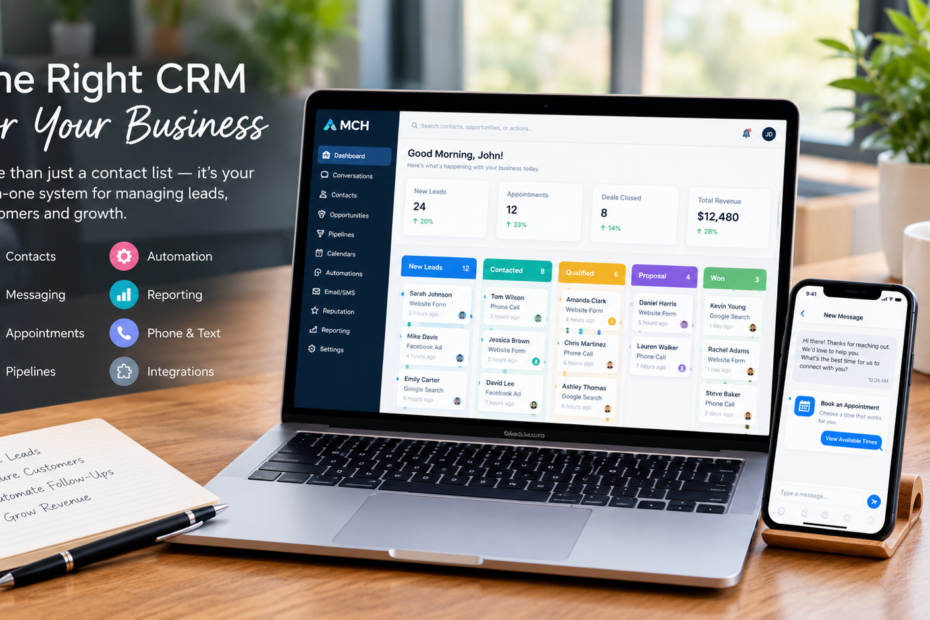
Choosing the right CRM for your business can be difficult when there are so many platforms promising to organize your customers, improve sales, and automate your day-to-day work. A CRM should do more than store contact information. It should help your team manage leads, track conversations, follow up consistently, schedule appointments, and understand what is happening across the customer journey.
In this guide, we’ll explain what to look for in a CRM, which features matter most, and how to determine whether a CRM is actually a good fit for your business.
What Is a CRM?
A CRM, or customer relationship management system, is software that helps businesses organize and manage interactions with current and potential customers.
A CRM gives your business one central place to manage contacts, leads, conversations, follow-ups, appointments, and sales opportunities.
Instead of keeping customer information across spreadsheets, email inboxes, notes, and different applications, a CRM brings important information into one organized system.
Why Does Your Business Need a CRM?
As a business grows, managing customer information manually becomes increasingly difficult.
A CRM can help your team:
- Keep customer information organized
- Track new leads
- Monitor sales opportunities
- Manage follow-ups
- Record customer conversations
- Schedule appointments
- Automate repetitive tasks
- Track where leads are in the sales process
- Review business performance
The goal is not simply to have another piece of software.
The goal is to create a system that helps your team work more efficiently and prevents opportunities from being overlooked.
What Should You Look for in a CRM?
The right CRM depends on your business, but several core features are useful for almost any growing company.
1. Contact Management
Your CRM should make it easy to create, organize, search, and update customer records.
A useful contact record can include information such as:
- Name
- Phone number
- Email address
- Company
- Communication history
- Notes
- Tags
- Appointments
- Sales opportunities
This gives your team context before they communicate with a customer or prospect.
2. Lead and Pipeline Management
A CRM should make it easy to see where each potential customer is in your sales process.
For example:
New Lead → Contacted → Qualified → Appointment → Proposal → Won
A visual pipeline allows your team to quickly identify which opportunities need attention.
Without a clear pipeline, leads can easily become buried in emails, spreadsheets, or individual employees’ notes.
3. Communication Management
Your CRM should help your team keep track of customer communication.
Depending on your business, this may include:
- SMS
- Phone calls
- Website conversations
- Appointment communications
Keeping these interactions connected to the contact record gives your team a clearer picture of the customer relationship.
4. Automation
Automation can help your team handle repetitive tasks without manually completing every step.
For example, a CRM can be configured to:
- Send a follow-up after a new inquiry
- Remind customers about appointments
- Notify a team member when a lead responds
- Move an opportunity to another stage
- Start a nurture sequence
- Assign leads to specific team members
Good CRM automation handles repetitive processes while allowing your team to stay in control of important customer conversations.
5. Appointment Scheduling
If your business relies on consultations, estimates, meetings, demonstrations, or appointments, scheduling should be easy for both your team and customers.
A CRM with built-in calendar functionality can help reduce back-and-forth communication and keep appointments connected to customer records.
6. Reporting
A CRM should help you understand what is happening with your leads and customers.
Depending on the system, reporting can help you monitor:
- New leads
- Appointments
- Sales opportunities
- Conversion activity
- Team activity
- Customer communication
- Revenue-related metrics
This information can help you identify where your sales process is working and where it needs attention.
Should You Choose an All-in-One CRM?
An all-in-one CRM combines multiple business functions within one platform.
Instead of using separate systems for contacts, communication, automation, appointments, pipelines, and reporting, businesses can manage these activities from one place.
An all-in-one CRM can reduce the need to move information between multiple disconnected tools.
For example, a new website lead could enter the CRM, receive an immediate response, be placed into a pipeline, trigger a team notification, and eventually schedule an appointment.
When these systems are connected, your team has fewer manual steps to manage.
What Happens When Your Tools Are Disconnected?
Imagine a business using:
- One system for contacts
- Another for email
- A spreadsheet for sales opportunities
- A separate calendar for appointments
- Another tool for text messaging
Each tool may work well individually, but your team has to move information between them.
This can lead to:
- Duplicate information
- Missed follow-ups
- Inconsistent customer records
- More manual work
- Less visibility into the sales process
A connected CRM can help reduce these problems by keeping important customer activity within one system.
How Do You Know Which CRM Is Right for Your Business?
Before choosing a CRM, consider how your business actually operates.
Ask yourself:
What Does Your Team Need to Manage?
If your team primarily needs contact management, you may not need a complicated system.
If you need lead tracking, automation, communication, appointment scheduling, and reporting, look for a CRM that can support the entire process.
How Many People Will Use It?
A CRM should be practical for everyone who needs access.
Consider:
- User access
- Team roles
- Permissions
- Collaboration
- Training requirements
A system that your team does not understand will not deliver much value, regardless of how many features it has.
Can It Grow With Your Business?
Your CRM should support your business as your customer base and team grow.
Consider whether you can add:
- More contacts
- More users
- More pipelines
- More automation
- More communication channels
- Additional integrations
Changing systems later can be time-consuming, so scalability is worth considering before you commit.
A Simple CRM Evaluation Checklist
Before choosing a CRM, compare the platforms you’re considering against your actual needs.
| Feature | Why It Matters |
|---|---|
| Contact Management | Keeps customer information organized |
| Pipelines | Shows where opportunities are in the sales process |
| Email & SMS | Keeps communication connected |
| Automation | Reduces repetitive manual tasks |
| Calendars | Makes scheduling easier |
| Reporting | Helps measure business activity |
| Integrations | Connects other tools and systems |
| User Management | Helps teams work together |
| Mobile Access | Allows teams to work away from the office |
The right CRM is not necessarily the one with the longest feature list.
It is the one that fits your processes and helps your team accomplish its work.
Common CRM Mistakes to Avoid
Choosing a CRM based only on its feature list can create problems.
Avoid:
- Buying features your team will never use
- Choosing a system that is difficult to learn
- Ignoring automation capabilities
- Failing to plan your sales pipeline
- Keeping important customer information outside the CRM
- Choosing software without considering future growth
- Failing to train your team
A CRM works best when it becomes part of your team’s everyday workflow.
How Market Central Hub Can Help
Market Central Hub brings CRM, contact management, pipelines, communication, automation, calendars, reporting, and other business tools together in one platform.
Businesses can use it to organize customer information, manage opportunities, communicate with leads, automate repetitive processes, schedule appointments, and track activity.
Instead of constantly switching between different systems, your team can build a connected process around the way your business actually operates.
Final Takeaways
Choosing a CRM is about more than finding software with a long list of features.
The right system should make it easier for your team to:
- Organize customer information
- Capture and manage leads
- Track sales opportunities
- Follow up consistently
- Communicate with customers
- Schedule appointments
- Automate repetitive work
- Monitor business activity
A CRM should simplify your customer management process, not add another layer of complexity.
If you’re ready to bring your contacts, communication, automation, pipelines, calendars, and reporting into one connected system, explore Market Central Hub to see how it can fit into your business workflow.